
Software development is changing. Instead of planning and developing software for the next several years and only then presenting it to the customer, business departments often work with small hypotheses. These hypotheses are validated directly with customers using A/B tests and then flow into the development process as new user stories. This allows business processes and existing software to be optimized step by step. Through this approach, business departments build software that their customers actually want. This naturally confronts IT departments with the challenge of having to deliver more often and faster, in order to benefit more quickly from test results and ultimately generate more revenue.
For example, a simple change to the color of a link in an online shop can trigger a conversion increase of 20%. Such a change can be implemented relatively quickly, but even with Continuous Delivery and a deployment pipeline the run through to production can take several hours, which can cost quite a lot of money. There are therefore voices who believe that such long lead times are rooted in the architectural structure of the applications.
Structure of web applications
Web applications are often composed of the following three parts:
- A user interface (e.g. HTML),
- a database, and
- a server component.
The server component takes care of processing HTTP requests, executes the domain logic, reads and writes data from/to the database, and determines which parts of the user interface need to be delivered. Every change in this system requires a build and a deployment of a new version of the entire software. Such applications are also called monoliths.
Even though monoliths can be very successful, there is a growing number of people who are not satisfied with this approach, because even small changes require very long lead times to production, and development teams no longer scale properly, since they repeatedly have to go through the complex and time-consuming build processes of the monolith, and changes to the software become increasingly difficult. In addition, monoliths scale poorly. If you want to scale such a monolith, you always have to distribute the entire application, even if only certain parts of the application are causing performance problems.
There are voices who believe that the classic three-tier architecture no longer scales well enough to be able to deliver small, profitable features quickly enough. That is why the concept of microservice architecture is enjoying ever-growing popularity. The goal is to cut the application along its business domains and divide it into small services that can be delivered independently of one another. This is meant to reduce the lead time of a feature until it reaches production.
Microservice architecture cuts applications into a number of services. These services can be deployed and scaled independently. Each service provides a well-defined piece of business functionality, can be implemented in any programming language, and can be provided by different teams. If you cut a piece of software into independent services, you naturally create a large number of deployment artifacts. Often, though, operations already has trouble with the deployment of a single monolithic application. That’s why a way must be found to better resolve the dependencies that are needed for a successful delivery.
Deployment of web applications
As a rule, web applications are deployed into an application server. An application server represents a container that provides special services, such as transactions, authentication, or access to directory services, web services, and databases through defined interfaces.
To standardize deployment in an application server, there is the Web Archive and the Enterprise Archive. A Web Archive is a file format that describes how a complete web application, according to the Java Servlet specification, is packaged into a JAR- or ZIP-format file. An Enterprise Archive is likewise a file in JAR or ZIP format that contains a complete application program – usually a web application – according to the Java Platform, Enterprise Edition (Java EE) standard. Unfortunately, these two standards are not sufficient to resolve all the dependencies that an application needs for trouble-free operation.
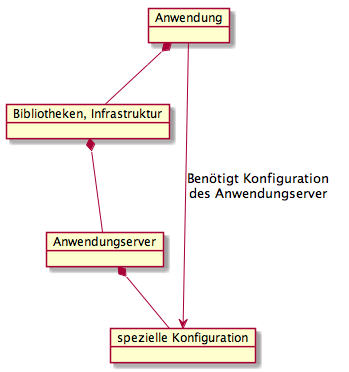
The diagram shows the dependencies between the application and the application server. An application depends on the application server, because the application uses libraries and infrastructure of the application server. Conversely, the application server also depends on the application, because the application server has to be configured specifically for an application. This means an application server is actually part of an application, and one should view the application server and the application as a single component.
If a new version of the application also requires a new version of the application server, there are often many manual steps for operations to carry out, because these dependencies cannot be expressed in a WAR or an EAR. These dependencies are then often described textually in the form of a ticket, and if you’re lucky, the instructions are carried out correctly by operations. Something similar applies to database changes. It would therefore be desirable to have deployment artifacts that can also express these dependencies. One example of such deployment artifacts is provided by Apple.
Deploying applications through the App Store
 Apple delivers more than 800 apps per second through the App Store (source). In typical Apple fashion, you download an application, and after a single click on the icon the application always runs immediately, without the user having to do anything else.
Apple solves the challenge of delivering an application with the so-called Application Bundle. Native Mac OS X applications are more than just a simple executable file, even though a user in the Finder always only sees a single ic on. Under Mac OS X, an application bundle consists of a directory structure that contains both the executable files and all the resources needed by an application. This structure is precisely defined by Apple.
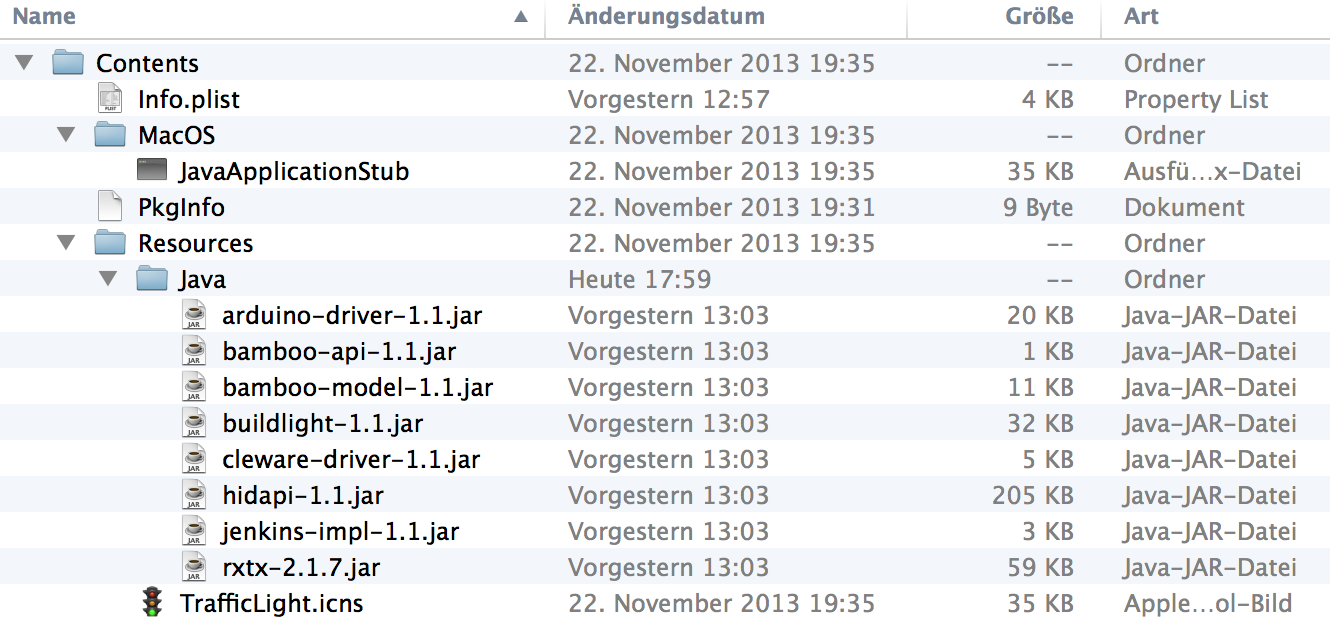
An application bundle contains the following directories and files:
- An Info.plist file in the Contents directory, which contains important metadata that Mac OS X uses to launch the application. (“Java Dictionary Info.plist Keys”)
- In addition, a file named PkgInfo should be included in the Contents directory. (“Data Type Registration”)
- The icons that are displayed in the Dock and in the Finder are located in the Resources directory.
- The Resources directory also holds files that are needed for execution.
- The executable files are located in the MacOS directory.
If you want to publish an application in the App Store, all the resources needed by the application must be delivered together with the application. Otherwise the application is rejected by Apple and cannot be published. This concept seems wonderfully suited to delivering a microservice. In production, however, one usually does not have Apple servers. That’s why it would be desirable to have an alternative concept for this. Web applications are frequently deployed to a Linux server. The application therefore has an additional dependency on infrastructure, and this dependency can be used to deliver the application.
Linux package management
Most Linux distributions have a software package management system. A software package management system enables convenient management of software available in package form. This includes installing, updating, and uninstalling the software.
A prerequisite for package management is that the software to be installed is available as a corresponding package. Such a package is usually created, offered, and maintained by an operating system vendor. Software is usually distributed and installed across various directories of the system. These directories are defined in the Filesystem Hierarchy Standard.
Changes that the package manager needs to make to the system in order to install the package are read out of the package by the package manager and applied. If the package manager detects in the process that additional software is needed for it to function (a so-called dependency, e.g. a program library) but is not yet installed, it either warns about this or tries to fetch the missing software using the means available to it, e.g. from a repository, and install it beforehand.
Concrete examples of programs used to install software packages are:
- The program RPM, which can install and remove packages of type *.rpm, and
- the program Dpkg, which can install and remove packages of type *.deb.
Neither of them, however, can resolve dependencies, since they have no functions for fetching additional software. This can be done by higher layers of package management such as YUM, APT, pkg-get, and others. With YUM or APT it is thus also possible to express the dependencies between the application server and the application. Since I frequently use Ubuntu and am therefore more familiar with deb packages, I would like to discuss these in the following. The concepts for rpm packages are, however, similar.
Structure of a deb package
Every deb package consists of three files that can be unpacked using the UNIX command ar or the Debian-specific command dpkg-deb :
- debian-binary: a text file containing the version number of the package format used.
- control.tar.gz: a compressed archive that contains files used for installation or that list dependencies. Only a few examples are listed here. Further descriptions can be found, for example, in the Official Debian FAQ on .deb packages.
- control contains a short description of the package as well as further information, such as its dependencies.
- md5sums contains MD5 checksums of all files contained in the package, in order to detect corruption.
- conffiles lists the files of the package that should be treated as configuration files.
- preinst, postinst, prerm, postrm are optional scripts that are executed before or after installing, updating, or removing the package. They are executed with root privileges.
- data.* is a compressed archive and contains the actual program data with relative paths starting at the root directory.
Integration into the build system
With jdeb there is a library that provides an Ant task and a Maven plugin for creating Debian packages. This library is platform-independent and builds Debian packages without the installation of any additional tools.
Of course there is also a Gradle plugin that builds Debian packages. The plugin is also based on jdeb and forms a bridge between jdeb and Gradle. The following listing shows the use of the plugin together with the Application Plugin:
apply plugin: 'application'
apply plugin: 'pkg-debian'
debian {
    packagename = "product"
    publications = ['mavenStuff']
    controlDirectory = "${projectDir}/debian/control"
    changelogFile = "${projectDir}/debian/changelog"
    outputFile = "${buildDir}/debian/${packagename}_${version}.deb"

    data {
        dir {
            name = "${projectDir}/debian/data"
            exclusions = ["**/.DS_Store", "changelog"]
        }
        dir {
            name = "${buildDir}/debian-data/"
            exclusions = ["**/.DS_Store"]
        }
        file {
            name = "${projectDir}/src/main/resources/application.conf"
            target = "etc/product/application.conf"
            mapper {
                fileMode = "755"
            }
        }
    }
}

task prepareDeb {
    dependsOn installApp

    copy {
        from "${buildDir}/install/"
        into "${buildDir}/debian-data/usr/share/"
    }
}
Summary
At first glance, the microservices movement looks like the reactive manifesto of the business department. By working on business domains in parallel, what was previously a monolithic application deployment can be parallelized, allowing IT to deliver faster. In doing so, however, you create a large number of deployment artifacts that need to be managed. Often a monolithic deployment is already hard enough, since so many dependencies exist. Very often applications are deployed on Linux systems. This dependency on the infrastructure, however, can also be exploited by using the package management of the Linux systems to deliver the applications: instead of simply building a Web Archive (WAR file), you deliver a Linux package that contains everything a service needs in order to run properly. The package manager then resolves all the dependencies needed for an application/service to run, and automatically carries out all the steps necessary to install the software. This gives you an Apple-like deployment experience on Linux systems, and you can build yourself a kind of App Store in the form of a repository, which greatly simplifies the delivery of software. In theory, this approach makes it possible to deliver your entire IT stack with just a single command — for example, running “apt-get upgrade” updates all packages to an improved version wherever possible.

Retrospective (2026)
Looking back, the deb-package approach was a reasonable answer to a real problem, but history took a different turn: within two years of writing this, Docker and then Kubernetes became the de facto standard for exactly the dependency problem I was describing here, and they solved it more generally by packaging the whole filesystem and runtime rather than just hooking into the host’s package manager. apt/dpkg and the Gradle debian-plugin still work fine for single-server Linux deployments or embedded/appliance use cases, but for anything that needs to scale horizontally, run on mixed infrastructure, or be orchestrated declaratively, containers won out decisively, and I’d no longer recommend the deb route for a new microservice today. What strikes me now is how much this old problem rhymes with my current work on AI agents: autonomous agents also need reproducible, dependency-complete “bundles” of tools, prompts, and runtime state that can be deployed and scaled independently, and the lesson from this 2014 detour holds — whoever defines the standard packaging format for agent deployment will shape the ecosystem the way Docker eventually shaped microservices.