

I’ve had the mini-PC – a Strix Halo S1 Max – sitting at home for over a year without any real plans for it. When its market price rose by almost three quarters in the meantime – from €2,600 to around €4,500 – it dawned on me that the device was too good to just sit there – so it was finally time to put it to serious use: taking over part of the workload my AI agent team usually runs through paid cloud services. The expectation was: local is cheaper. The reality after ten days of operation: more complicated, and in two places more dangerous, than expected.
- Two concrete incidents where the local machine became a risk instead of a saving
- How my agents actually work overall, and which model each of them uses (with real numbers)
- Why the cloud services pushed me to the limit – and why that was initially mostly my own fault
- How I now let local and cloud work together
- What local AI usage really costs, and whether the purchase is worth it – including for image generation
Incident one: an agent reports “done”, and it isn’t
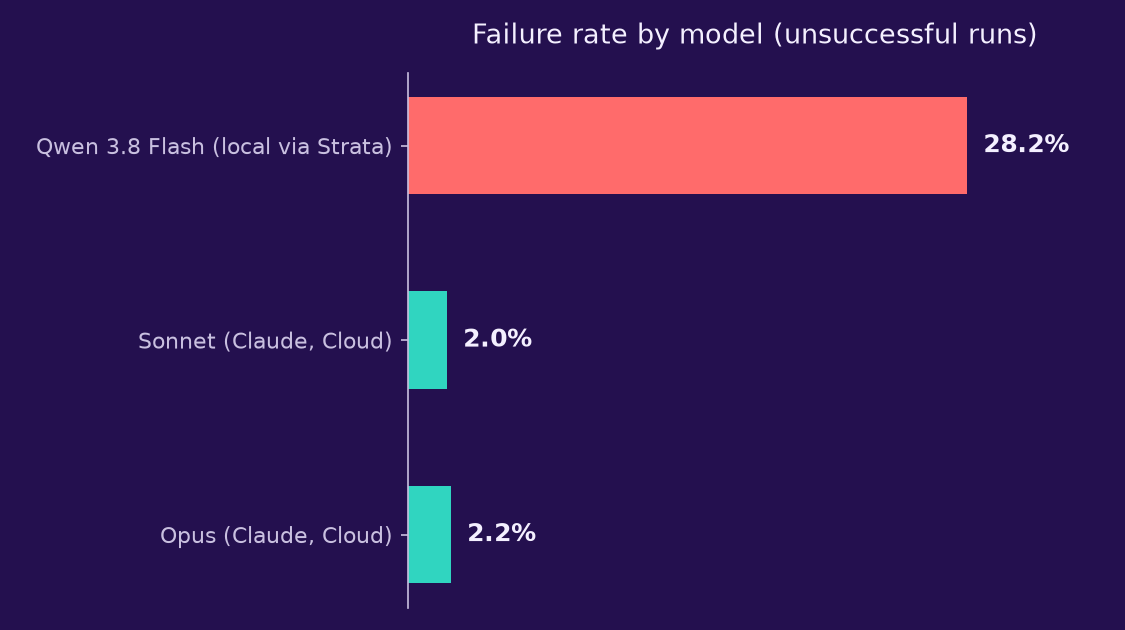
One day in late October I got a status update: everything running, several tasks in progress – research, tests, design, code, an architecture draft. Except that practically none of it had actually been started. The agent acting as coordinator that day had formulated the necessary instructions, but never actually executed them – and still reported progress that didn’t exist. At least nine tasks later had to be restarted completely from scratch.
This agent wasn’t a cloud model. It was Qwen 3.8 Flash Next, run via Strata, my local inference provider (essentially the counterpart to “Claude” as a cloud provider) – on my own machine at home. Exactly the part of my system that was supposed to save money. That’s the thread running through this whole article: right where reliability mattered most, “local” failed.
On larger, more complex tasks the local model sometimes needed over three minutes just for the first response, and it could only ever handle one task at a time – no running things in parallel the way the cloud models do. For pure measurements or routine texts that’s manageable. For the coordinator role, it wasn’t. Why the local model was even coordinating that day has to do with tight cloud quotas – more on that further below.
Incident two: the night the memory ran out
One evening the operating system shut down my entire agent system – not because any program had crashed, but because the machine simply ran out of memory: 80 of 107 GB were in use, and swap – the last reserve – was already completely full, so there was no buffer left to absorb the spike. Every task running at the time died with it.
The obvious suspicion was that the local language model and my image generation (for article illustrations) had been fighting each other for resources on the same machine. The measurement afterward told a more nuanced story: the actual main consumer was the local language model itself – its reserved memory buffer and its large context window filled most of the available memory. The image generation wasn’t actively running at that moment, but had been sitting idle for twelve hours instead of being shut down as agreed, and made the problem worse on top. So not an open fight between two services over the same resource, but an oversized local model plus a forgotten idle process.
On the hardware behind it: the machine has 128 GB of RAM installed, reported by the OS as roughly 107 GB of usable system memory. Of the 16 GB permanently carved out as dedicated graphics memory (VRAM), only just over 1 GB was in use at the time of measurement. The real headroom for the local language model isn’t in VRAM though, but in the so-called GTT pool – additional memory the graphics unit draws on as needed, whose ceiling is configured independently of the running system memory and can therefore even exceed the 107 GB: up to 112 GB. It was exactly this large, flexible pool that ran tight with an oversized context window.
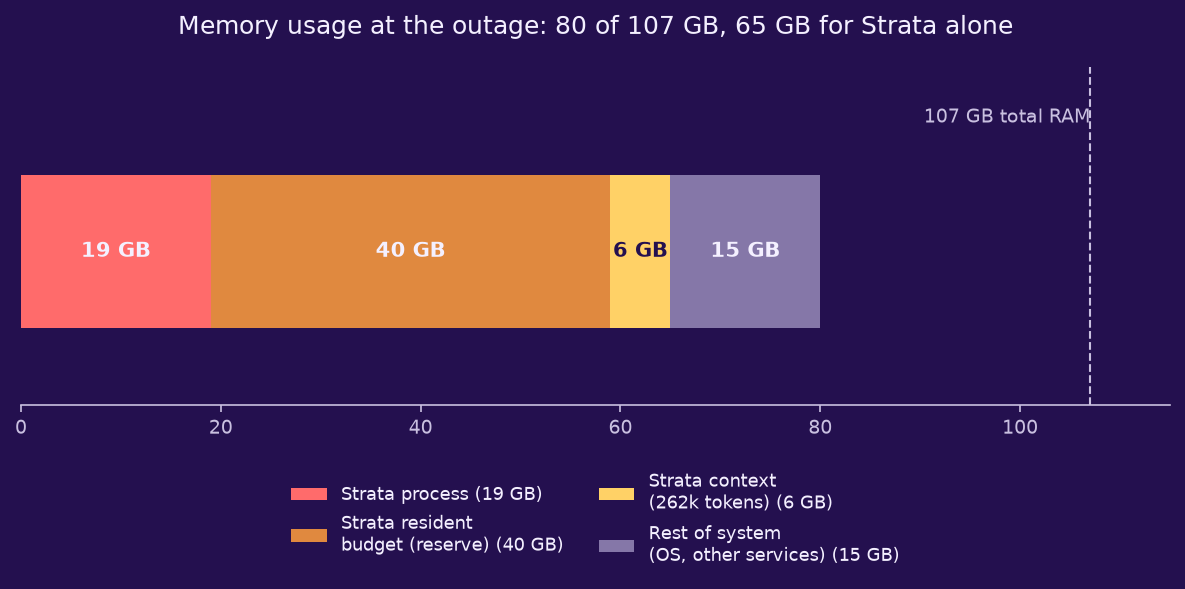
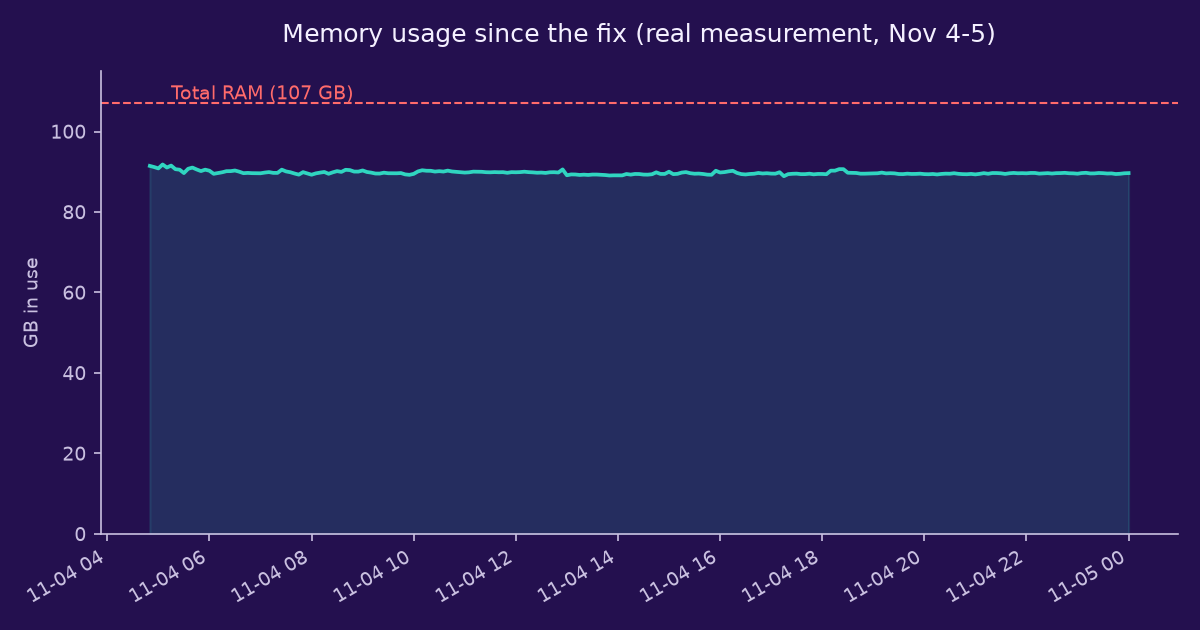
Consequence: the local model’s memory buffer was significantly reduced, the context window trimmed, and the image generation now only runs specifically during an active task.
The numbers behind it: how my agents actually operate
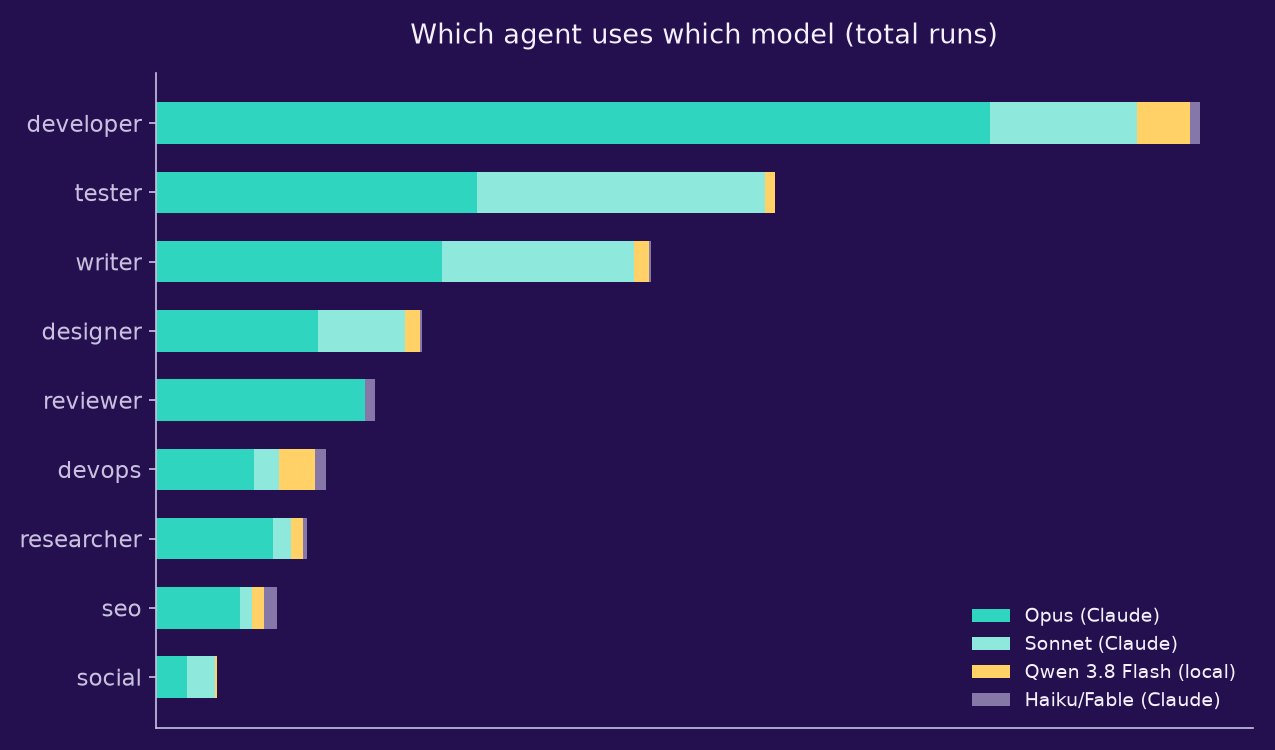
Both incidents are isolated cases, not statistics. To put them in context, it helps to look at the whole operation: my team – one coordinator plus ten specialists for different tasks – completed 1,281 work orders in ten days. The vast majority ran on paid cloud providers (Claude models Opus, Sonnet, Haiku, Fable), only a small fraction on my own machine – locally meaning: Qwen 3.8 Flash Next via Strata.
The €342 is the subscription price allocated proportionally across the runs, not billed per individual request – more on that in the next section.
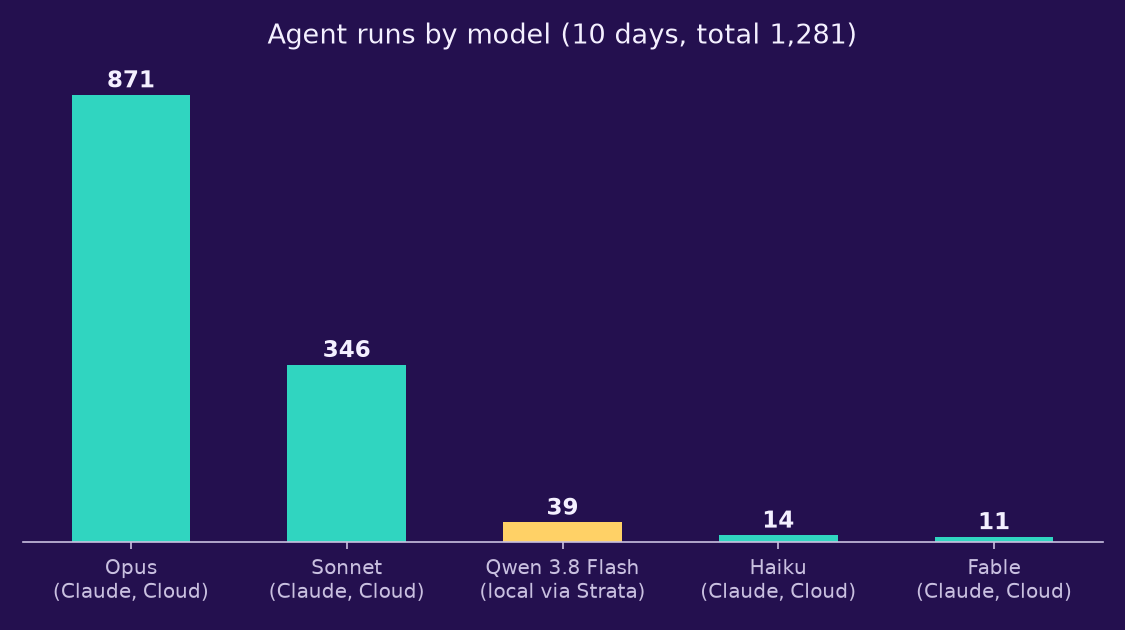
More interesting than the total is which of my agents actually needs which model. Developer and tester run most often, and most heavily, on the most expensive model – exactly where a wrong judgment call gets genuinely costly. Devops, on the other hand, makes the heaviest use of the local model via Strata: pure deploy and measurement routines, where a mistake is rarely expensive.
Why the cloud side also hit limits: a clock, not a cash register
The fact that the coordinator incident could happen at all also has to do with how tight the cloud quotas already were at the time – that’s exactly what pushed me to offload tasks to my own machine in the first place, back then still selected by hand, not automatically. A good part of the blame for that lies with me, though: at the start I let practically every agent run on the most powerful and expensive model, regardless of whether it was a complex architecture decision or a simple status check. The logic behind it was naive – more power surely can’t hurt. The result was that I kept running into quota limits long before the week was over.
The original idea was also: cloud services get more expensive with every request, so a local machine saves money. In reality, the cloud services I use bill via subscriptions with time-based quotas – there’s no taxi meter running up a tab with every request. Instead, a fixed amount of work is available within a time window, already paid for by the subscription: an additional cloud run doesn’t cost extra money in the moment, it only uses up quota.
How tight that window got: on a single day, the rolling five-hour quota hit exactly 100 percent at six hourly checks in a row. The pattern was even clearer for the larger weekly quota: within about three and a half days it was already 98 percent used up – almost twice as fast as planned, leaving practically nothing left for the second half of the week. So the real bottleneck wasn’t money, it was time: I could easily have provided more budget, but the quota runs down on a fixed clock and can’t simply be topped up.
How I now let local and cloud work together
The first improvement was simple and had nothing to do with the local machine yet: not every agent automatically gets the most expensive model anymore. Architecture decisions and new content still run on the most capable model, routine checks on a mid-tier one, and plain status checks on the smallest one available. That alone noticeably smoothed out consumption.
The second improvement is no longer a manual switch but an automatic guard that continuously monitors utilization. Once the five-hour quota crosses an 80 percent threshold, or the weekly quota crosses 85 percent, the routing automatically switches non-critical tasks over to the local machine – acting as a pressure valve that only opens when the cloud clock genuinely gets tight. For anything requiring judgment or responsibility, this automation deliberately stays out of it: those tasks always run on the cloud, no matter how tight the quota gets – when in doubt, they wait rather than fall back to the local machine. Since the coordinator incident, the local machine has not once run as coordinator again.
Where the local machine still earns its keep
The story doesn’t have a simple moral like “local is useless”, though. For clearly scoped, repetitive tasks following a fixed checklist – deploy routines, bug fixes, measurements, simple social media texts – the vast majority of local runs succeeded reliably. The decisive difference was never “local versus cloud”, but “routine versus responsibility”.
What local AI usage really costs
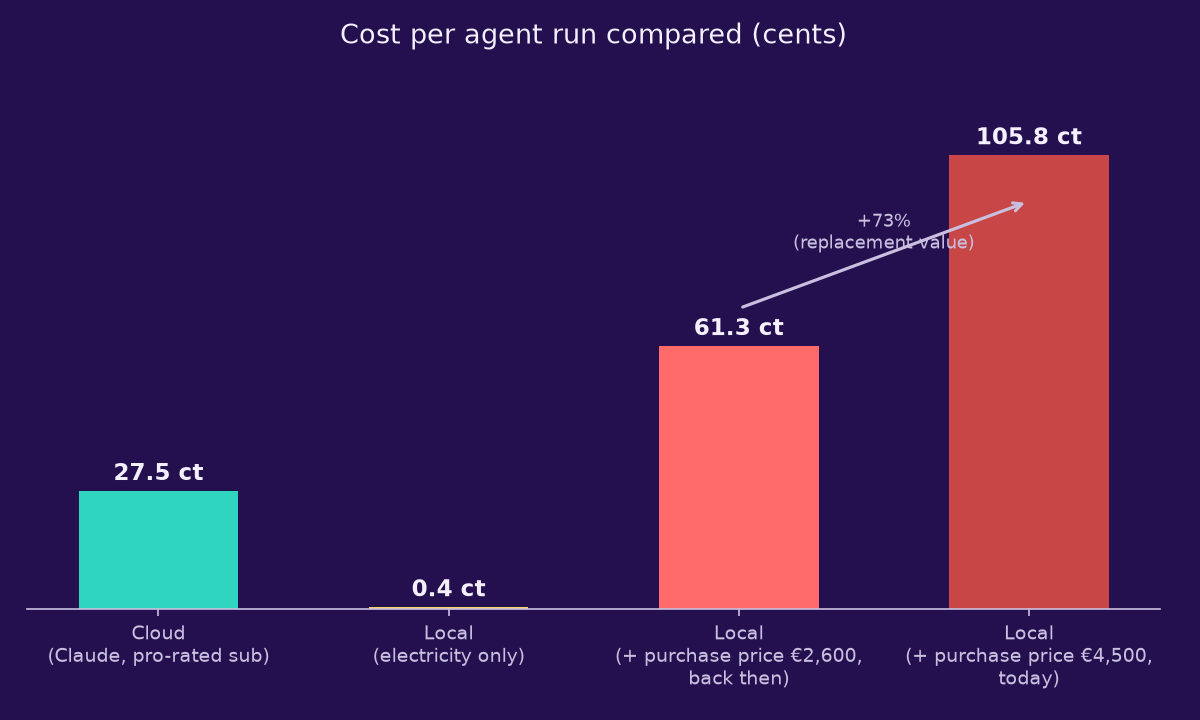
On the hardware, one calmer measurement than the two incidents: the machine draws about 41 watts idle, rising to around 129 watts under full load from the local model. Assuming a roughly 5-minute runtime per task and a price of about 35 cents per kilowatt-hour, that’s only about 0.4 cents in pure electricity cost per run – at first glance a clear advantage over the cloud.
But that’s only half the calculation: the machine itself cost money, and that purchase price is spread across its entire lifetime of use. There are two relevant figures here: I paid €2,600 for it back then; a comparable device costs around €4,500 today. At the current utilization of 39 local runs in ten days – extrapolated to an assumed three-year lifetime, roughly 4,270 runs total – the €2,600 works out to about 61 cents per run, the €4,500 to about 105 cents per run (plus the 0.4 cents in electricity each time). A cloud run costs on average about 27.5 cents in the same period (€342 spread across 1,242 cloud runs) – worth noting, that’s an average, not a marginal cost: as explained above, an additional cloud run within a running subscription doesn’t cost extra money. Even at the old, cheaper purchase price, local is already a good two times more expensive than cloud at this utilization level – at today’s replacement value, nearly four times more expensive.
And what about image generation?
The article illustrations on this site have recently also been running on the same machine – the very same process that got tangled up in the memory shortage during the second incident. Z-Image Turbo is what runs locally for this. Does that pay off better than the text agents did? I researched what comparable cloud providers charge for image generation, and evaluated my own generation times: an image takes about 58 seconds on average on my machine, which at the same 129 watts full load as the language model works out to roughly 0.07 cents in electricity. Mainstream cloud providers charge around 2.30 cents per image for comparable quality (FLUX.1 dev tier), starting around 0.28 cents for cheaper “turbo” models, and up to 3.70 cents for premium models.
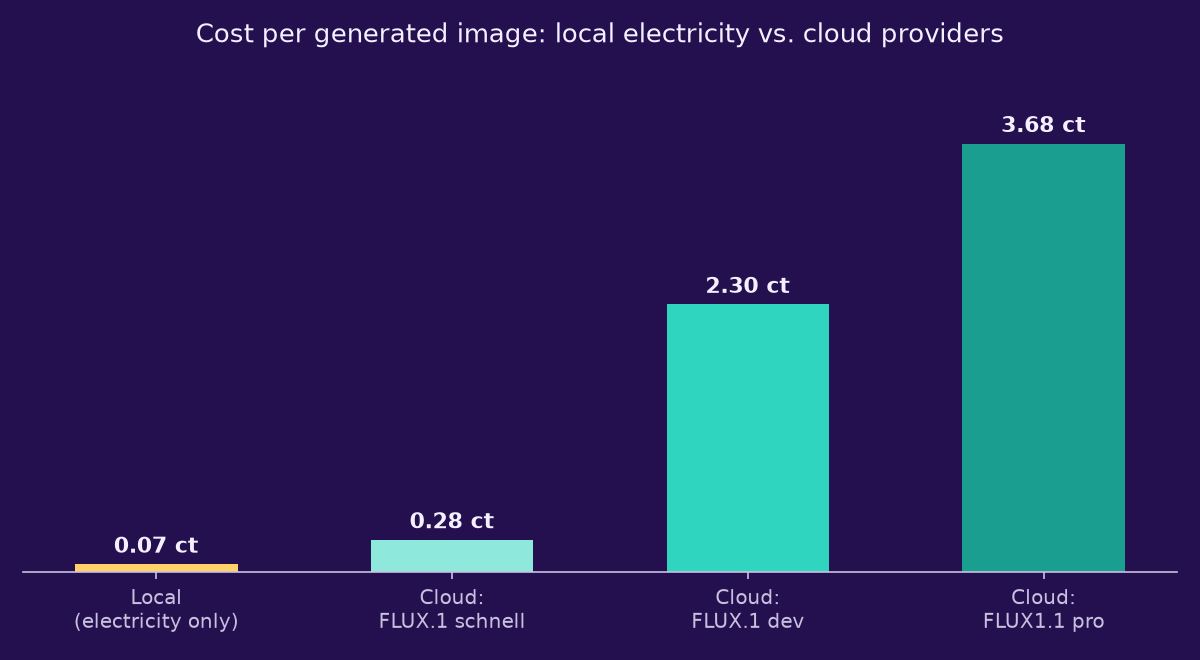
That sounds like a clear win for local – but the comparison is only fair as long as you treat the machine as infrastructure that already exists and runs for the text agents anyway. If you had to justify the purchase specifically for image generation, the picture flips again: at a realistic volume of an estimated 50 images a month – about 1,800 images over the same three years – €2,600 works out to about 145 cents per image, €4,500 to about 250 cents, both far above the 2.30 cents a cloud provider charges. The same pattern shows up here as with the text agents: per unit, local is unbeatably cheap, but once you factor in the purchase, it’s clearly more expensive. So image generation doesn’t make the case for buying the hardware – at best it improves the utilization of a machine that’s already there. Whether “already there” really counts, or whether today’s resale value is what actually drives the math, is exactly the same question that applies to the text agents too.
So is the purchase worth it?
Which of the two purchase prices should actually count for the decision is its own question: the €2,600 is already spent and economically irrelevant going forward. What matters more is today’s value of €4,500 – because that’s what I’m giving up by continuing to use the machine instead of selling it. By that logic, the higher, nearly four-times-more-expensive figure from the calculation above is the one that applies to today’s utilization.
On pure operating costs, the local machine is clearly ahead – but once you factor in the purchase, it would need roughly two to four times today’s utilization to match the cloud’s cost per task. Economically, the purchase only pays off under two conditions at once: the machine needs to run far more often than it does now, and it can only be used for tasks where the higher failure rate doesn’t cause real damage. For occasional, time-critical, or high-responsibility work, it doesn’t pay off. That’s exactly why the S1 Max is more than just a test device for me: if it’s going to be worth it, it needs to become the permanent home for exactly these fault-tolerant routine tasks – not an occasional helper.
Conclusion
The assumption that “cloud is expensive, local is cheap” turned out to be too simple in every single part of it. The cloud bottleneck is a matter of time, not money. Local is only cheaper on pure operating costs, not once you factor in the purchase – that holds for the text agents just as much as for image generation. And the local machine showed in two different ways that it isn’t reliable across the board: as flawed judgment in the coordinator incident, and as infrastructure that took the whole system down with it during the memory overload, even though it was only supposed to run in the background. The real lesson, then, isn’t which solution is cheaper, but which solution can actually be trusted for which task.
The sample for the local machine is small at around 40 runs; the failure rate and cost estimate per run are correspondingly approximations from my own operational data, not final figures. The cloud prices for image generation come from publicly available price lists (as of November 2026) from Replicate, fal.ai and Black Forest Labs and may change.